

For those who know the previous edition of Diner Dash (like Flo on the Go, Flo Diner Dash Deluxe), you’ll be representing Flo once again. For those who don’t know the previous editions of the game, let’s tell that Flo owns five restaurants and is an expert on running food related businesses. This fun and easy-to-play game turns you into a very busy waitress trying to keep the customers happy, and that could get more difficult than it sounds. People keep coming for their tables. Once you get them the table, they want to order. Then, they want the food fast, and finally they want the bill! Everything has to be made fast and right; otherwise the customers will be mad and won’t tip you well.
You’ll be dealing with different types of customers, such as: celebrity, family, food critic, teenagers, hungry man, tourists, young lady, kindly senior, among others, all with different needs and patience levels.
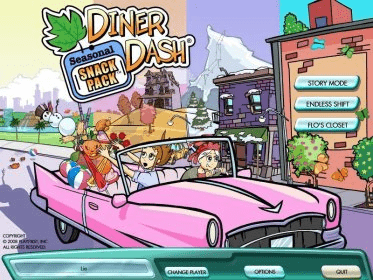
When you first enter the game, you’ll see the welcome screen with the following options:
- Change player: the first time there’s no existing player. After you create one or more, they’ll be saved. When you enter into this submenu, you’ll be asked for a name as a new player. It’s possible to have a list of different players and record their performance. This way, you can play home tournaments with family and friends.
- Story mode: this is one of the two modes available for playing the game. This option recreates a story in which you end up being a waitress. So you play in different scenarios.
- Endless shift: this is the other mode for playing the game. As its name suggests, you go right to your shift which will never end.
Flo’s closet: here is where you choose your clothes for work. You can buy new clothes as you play and win levels.
- Options: this is the menu from which you can set some game options like sound volume, music volume, environment volume, and full screen. You can also access help information from here.
- Quit: no further explanation required.
When you’re playing the game, you can always click on the Pause button to access to a pop-up menu with these options:
- Options: the same Options menu commented before.
- Help: it leads you to the help.
- Flo’s closet.
- Resume: to finish the current game.
- Restart Level: to start all over again.
- Quit: to go back to the welcome screen You can try this game for 60 minutes before you buy the licensed version.
You can try this game for 60 minutes before you buy the licensed version. If you like it, you can buy this game for only 19.95 dollars, right from the Oberon Media Game Center, on the Web.
About the systems requirements, here you have a list to check out:
- Windows XP, Vista
- Pentium III® 700 MHz
- Processor or better
- 128 MB Ram
- Min Screen Resolution: 800x600
- Sound Card: Recommended
- DirectX 7.0 or later
- 30 MB Free Hard Drive Space






Comments